What Are Digital Products? A Beginner’s Guide to Earning Online
Learn how regular freelancers, Etsy sellers, and homemakers build recurring online income without inventory, shipping costs, or trips to the post office.

Introduction
If you’ve spent time on Pinterest, TikTok, or Instagram, you’ve likely seen people talk about making money. Additionally, they discuss digital products and how regular people—freelancers, bloggers, Etsy sellers, or busy homemakers—make money from them.
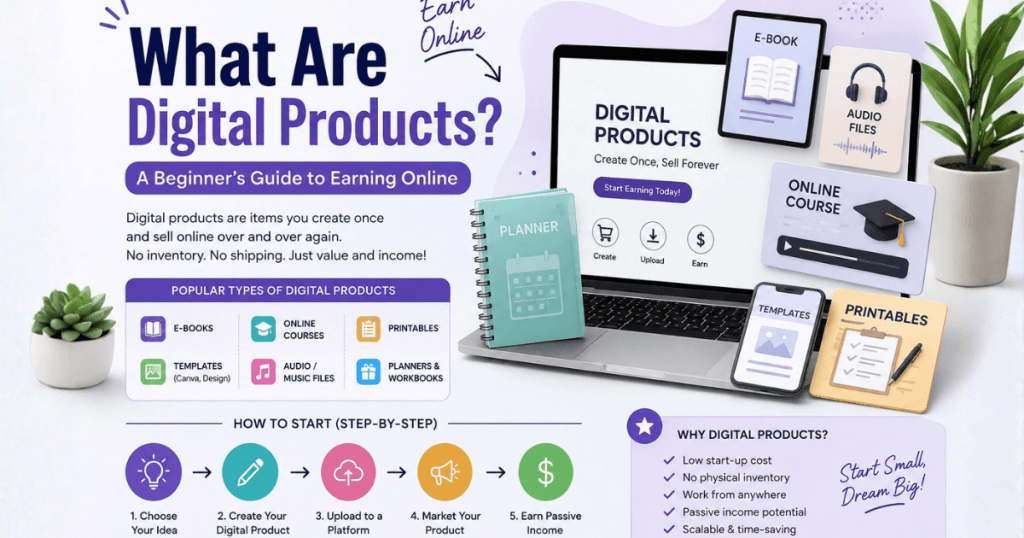
The short answer: digital products are things you create once and sell over and over again, without ever running out of stock or shipping a single box. No inventory. No packaging. No trips to the post office. Just a file that a customer downloads after paying you.
This guide explains digital products for beginners, including what they are and the types you can create.
However, it also covers how to start making and selling your own, plus common mistakes to avoid.
Moreover, by the end you’ll have a clear road map to get started, even if you’ve never sold anything online before.
Additionally, online business for beginners is discussed as part of this guide.
1. What Are Digital Products?
Digital products are items that exist only in digital form and are delivered electronically instead of shipped physically. A customer buys the product online, and instead of receiving a box in the mail, they get a download link, a file, or access to an online platform.
Some everyday examples you’ve probably already bought without thinking of them as “digital products” include:
- An eBook you downloaded to your phone
- A Canva template you used for your Instagram posts
- A printable wall calendar you bought on Etsy
- An online course you signed up for
- A stock photo you used in a blog post
Once you create a digital product, you can sell that exact same file to hundreds or thousands of people. This is the biggest reason digital products have become such a popular way to earn extra income, especially for people looking for flexible, work-from-home opportunities.
2. Why Digital Products Are So Popular Right Now
Digital products have exploded in popularity in recent years. Moreover, this rise shows why digital products are in high demand. Here’s what’s driving the trend.
- Low startup cost. You don’t need money for inventory, warehousing, or shipping supplies.
- Passive income potential. Create it once, sell it many times.
- Flexible schedule. Perfect for stay-at-home parents, students, and side-hustlers who need to work around other responsibilities.
- No physical limits. You can sell to customers anywhere in the world, at any hour of the day.
- Beginner-friendly tools. Platforms like Canva and Etsy have made it easier than ever for non-designers and non-techies to create professional-looking products.
For many housewives and stay-at-home parents, digital products have become an appealing way to earn online because the work fits around nap times, school runs, and household duties—there’s no boss requiring you to clock in at 9 a.m.
3. Types of Digital Products You Can Create
There’s a huge range of digital products you can make, even with basic skills. Here are the most popular categories:
printable and templates
- Planners (daily, weekly, budget, meal planning)
- Wall art and posters
- Wedding or party invitations
- Resume and CV templates
- Social media templates (great for Canva users)
Educational Content
- eBooks and guides
- Online courses
- Workbooks and worksheets
- Cheat sheets
Creative and Design Assets
- Fonts
- Digital stickers (great for apps like GoodNotes)
- clip-art and graphics
- Logo templates
- Presentation templates
Software and Tech Products
- Mobile apps
- Browser extensions
- Website themes and plugins
- Spreadsheets with built-in formulas (budget trackers, invoice templates)
Membership and Subscription Content
- Access to a private community
- Monthly template packs
- Exclusive courses or coaching content
You don’t need to be an expert in all of these. Most successful sellers pick one niche—like printable planners or Canva templates—and focus on getting really good at it.
4. How Digital Products Are Different From Physical Products
Understanding the difference helps you see why digital products are so appealing for beginners with limited time or money.
This is exactly why so many bloggers, freelancers, and Etsy sellers are shifting some or all of their focus toward digital products — the profit margins are simply better, and the barrier to entry is much lower.
5. Step-by-Step: How to Create Your First Digital Product
Ready to make your first digital product? Here’s a simple process to follow.
Step 1: Choose a Niche and Product Idea
Think about what you’re good at or interested in. Are you organized? Try planners. Do you love graphic design? Try Canva templates. Do you have expertise in a topic? Try an eBook or mini-course.
Step 2: Research What’s Already Selling
Browse Etsy, Pinterest, or Google to see what similar products already exist. This isn’t about copying—it’s about confirming there’s demand and finding ways to make your version better or different.
Step 3: Create the Product
Use a tool that matches your skill level.
Additionally, Canva templates are among the easiest places to start, with ready-made options you can customize.
Step 4: Design a Simple, Clear Mock-Up
Show buyers what they’ll receive with a clean preview image. This matters a lot for conversions, especially on visual platforms like Etsy and Pinterest.
Step 5: Set Up Your Sales Page or Store
Choose a platform (more on this below) and upload your product with a clear title, description, and pricing.
Step 6: Price It Fairly
Research similar products and price competitively while still valuing your time and skill.
Step 7: Promote Your Product
Use Pinterest, Instagram, TikTok, or blog content to drive traffic to your listing. Word of mouth and social sharing are huge for digital product sales.
6. Where to Sell Digital Products
You have several good options depending on your goals:
- Etsy — Great for printable, template, and craft-adjacent digital goods; built-in traffic from shoppers already searching.
- Gumroad — Simple setup for creators selling eBooks, templates, or courses directly.
- Your own website or blog—more control and higher profit margins, but you’ll need to drive your own traffic.
- Teachable or Thinkific — Best if you’re creating an online course.
- Creative Market — Good for design assets like fonts, graphics, and templates aimed at other creatives.
Many sellers start on Etsy because of its built-in audience, then expand to their own website as they grow.
7. Practical Tips for Beginners
- Start with one product instead of trying to build an entire shop overnight.
- Use free tools first (like Canva’s free plan) before investing in paid software.
- Write clear, benefit-focused product descriptions (“Save time meal planning” rather than just “Meal planner PDF”).
- Take advantage of Pinterest—it’s one of the best free traffic sources for digital product sellers.
- Ask friends or family to test your product before launching so you catch any confusing instructions or design issues.
- Bundle related products together once you have a few — bundles often sell better than single items.
- Keep your files organized and clearly labeled so customers don’t get frustrated after purchase.
8. Common Mistakes to Avoid
Even motivated beginners fall into a few predictable traps. Watch out for these:
- Trying to appeal to everyone. A product “for everyone” often appeals to no one. Get specific about who it’s for.
- Skipping research. Not checking whether people are actually searching for or buying similar products.
- under pricing out of fear. Many beginners price too low, which can actually make a product look lower quality.
- Ignoring the preview image. Buyers can’t touch or feel a digital product, so your preview mock-up does all the selling.
- Not testing the download process. Broken links or confusing file formats lead to refund requests and bad reviews.
- Giving up too early. Digital product sales often build slowly through search and social traffic — most sellers don’t see results in the first week.
- overcomplicating the first product. A simple, well-made planner will often outsell an overly ambitious course you never finish.
9. Best Tools and Resources for Digital Product Creators
Start with the free tools. You can always upgrade to paid plans once your digital product income justifies the cost.
Frequently Asked Questions
1. What are digital products in simple terms? Digital products are files or online content — like templates, eBooks, or courses — that customers download or access online instead of receiving something physical.
2. Do I need design skills to create digital products? No. Tools like Canva offer ready-made templates that beginners can customize without any design background.
3. How much money can I make selling digital products? It varies widely based on niche, marketing, and effort. Some sellers earn a small side income, while others build full-time businesses. Success usually comes from consistency, not luck.
4. What is the easiest digital product to start with? printable (like planners, checklists, or wall art) are one of the easiest starting points because they require minimal technical skill.
5. Is Etsy a good place to sell digital products? Yes, especially for beginners. Etsy already has millions of shoppers actively searching for printable and templates.
6. Can housewives or stay-at-home parents really earn online this way? Yes. Many stay-at-home parents build digital product businesses because the work is flexible and can be done during nap times or after the kids go to bed.
7. Do I need a website to sell digital products? Not necessarily. You can start on platforms like Etsy or Gumroad without building your own website first.
8. How do customers receive a digital product after buying? Typically through an instant download link or an email with access instructions, depending on the platform you use.
9. Are digital products profitable compared to physical products? Generally yes, because there are no shipping or material costs, which means higher profit margins per sale.
10. What’s the biggest mistake beginners make with digital products? Trying to create something for “everyone” instead of a specific, clearly defined customer with a specific problem.
Conclusion
So, what are digital products, really?
They’re simply digital files or online content that solve a problem or add value for buyers in online businesses for beginners.
Additionally, beginners, freelancers, bloggers, Etsy sellers, and housewives can use digital products to start a flexible, low-cost home business.
You don’t need to be a tech expert or professional designer to get started. Pick one simple idea, create it with a beginner-friendly tool like Canva, and list it on a platform like Etsy or Gumroad. Your first sale might not happen overnight, but with patience and consistency, digital products can become a real source of income.
Ready to get started? Choose one digital product idea from this guide, block out an hour this week, and create your very first template, printable, or guide. That one small step is how every successful digital product seller got started.
Zohra Ali
Founder of Digital Product by Zohra Ali. Helping creators, bloggers, freelancers, and Etsy sellers build scalable income streams through Canva templates, digital planners, and custom WordPress website design.
Ready to Launch Your Digital Product Brand?
Explore our editable Canva templates and printable planners, or schedule a 1-on-1 session to design your custom WordPress site.